Columns in the main tab
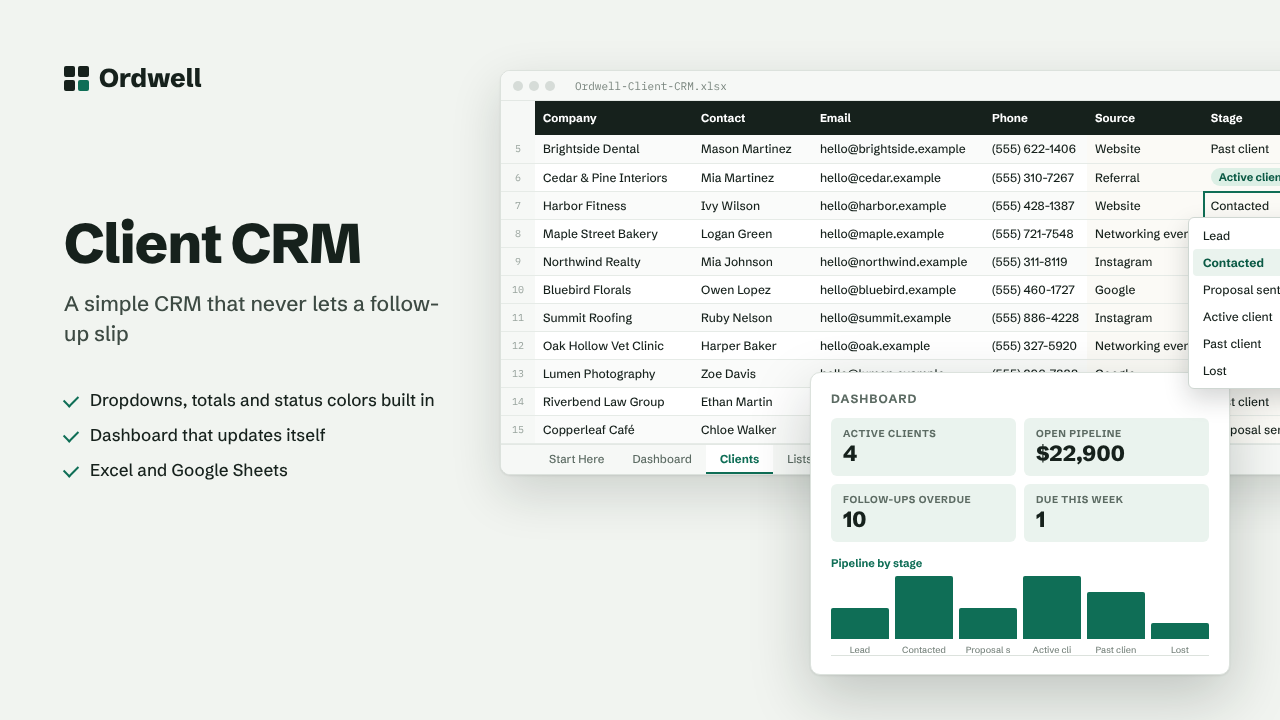
CompanyContactEmailPhoneSourceStageDeal valueLast contactNext follow-upNotesFollow-up
Excel & Google Sheets template
Client CRM
A simple CRM that never lets a follow-up slip
$14
Available this week · $14
- Works inExcel 2010+, Google Sheets
- TabsStart Here, Dashboard, data, Lists
- Rows ready500, formatted
- MacrosNone
- Sample dataIncluded, easy to delete
Need more than one? The Small Business Suite has all ten for $39.
How it works
- Add each client or lead on the Clients tab. Pick their stage and lead source from the dropdowns.
- Set a Next follow-up date. Rows turn amber when a follow-up is due this week and red when it is overdue.
- Use the Dashboard to see your pipeline value by stage and which lead sources bring paying clients.
- Rename stages and sources on the Lists tab to match how you sell.
On the dashboard
- Active clients
- Open pipeline
- Follow-ups overdue
- Due this week
- Win rate
- Contacts