Columns in the main tab
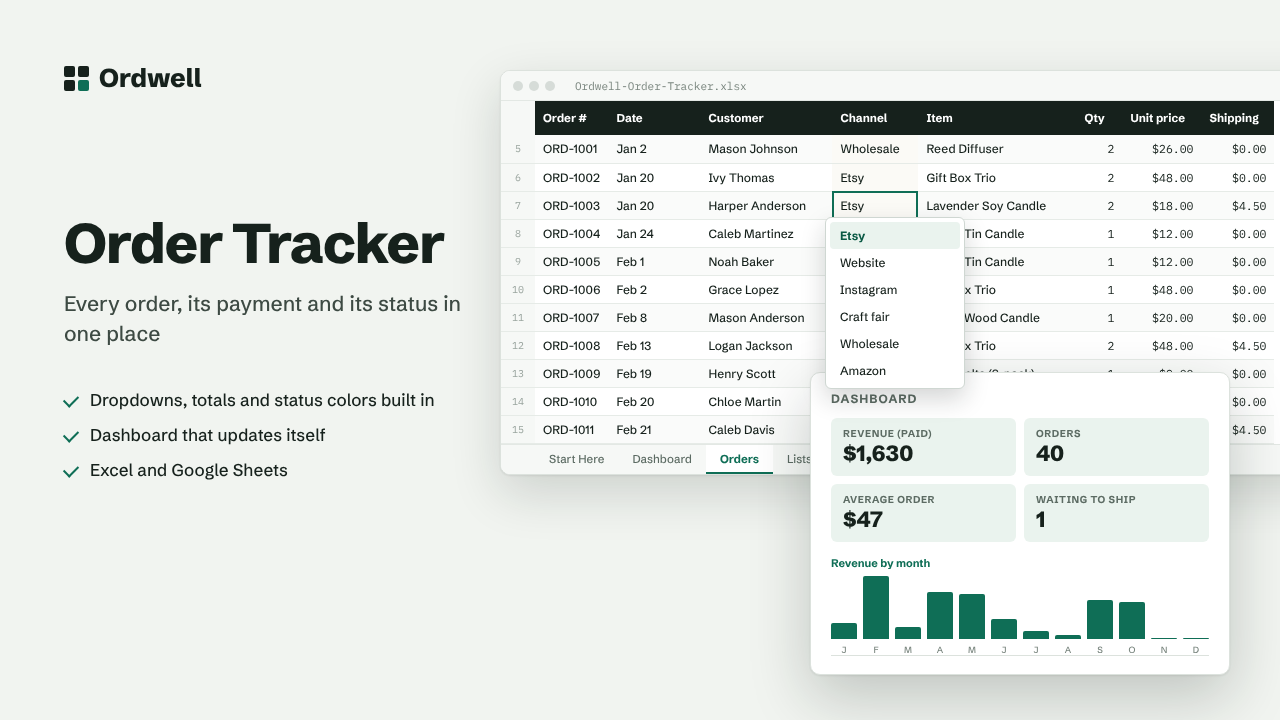
Order #DateCustomerChannelItemQtyUnit priceShippingOrder totalPaymentStatusDays open
Excel & Google Sheets template
Order Tracker
Every order, its payment and its status in one place
$12
Available this week · $12
- Works inExcel 2010+, Google Sheets
- TabsStart Here, Dashboard, data, Lists
- Rows ready500, formatted
- MacrosNone
- Sample dataIncluded, easy to delete
Need more than one? The Small Business Suite has all ten for $39.
How it works
- Add each new order as a row on the Orders tab. Pick the channel, payment and status from the dropdowns.
- Unit price, quantity and shipping are added up into the order total automatically.
- Open the Dashboard to see revenue by month, by channel and how many orders are waiting to ship.
- Edit the Lists tab to use your own sales channels, statuses and payment types.
On the dashboard
- Revenue (paid)
- Orders
- Average order
- Waiting to ship
- Payments pending
- Refunded