Columns in the main tab
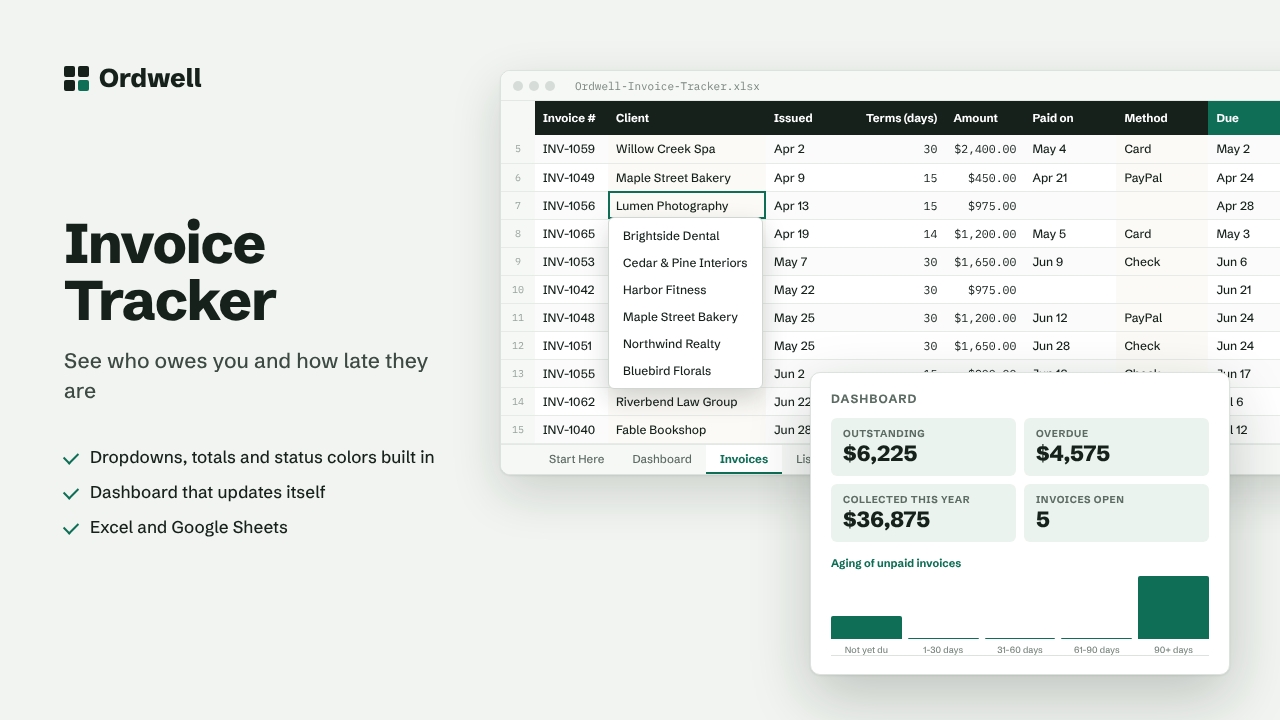
Invoice #ClientIssuedTerms (days)AmountPaid onMethodDueStatusDays overdue
Excel & Google Sheets template
Invoice & Payment Tracker
See who owes you and how late they are
$10
Available this week · $10
- Works inExcel 2010+, Google Sheets
- TabsStart Here, Dashboard, data, Lists
- Rows ready500, formatted
- MacrosNone
- Sample dataIncluded, easy to delete
Need more than one? The Small Business Suite has all ten for $39.
How it works
- Log each invoice you send on the Invoices tab: number, client, issue date, payment terms and amount.
- Due dates and days overdue are calculated from the terms. When you are paid, enter the paid date.
- Overdue invoices turn red. The Dashboard shows what is outstanding and an aging summary.
- Add your clients and payment methods on the Lists tab.
On the dashboard
- Outstanding
- Overdue
- Collected this year
- Invoices open
- Avg days to pay
- Invoiced this year