Guide
How to manage inventory in Excel
A simple method for retail, e-commerce and small warehouses. Works in Excel and Google Sheets, no macros needed.
Step by step
- List each item once with a SKU, name, supplier, cost and reorder point.
- Record every stock movement (in or out) on a separate log instead of overwriting the quantity.
- Calculate on-hand stock with SUMIFS over the log for each SKU.
- Flag items at or below their reorder point with conditional formatting.
- Check the stock value and low-stock list weekly.
Columns to include
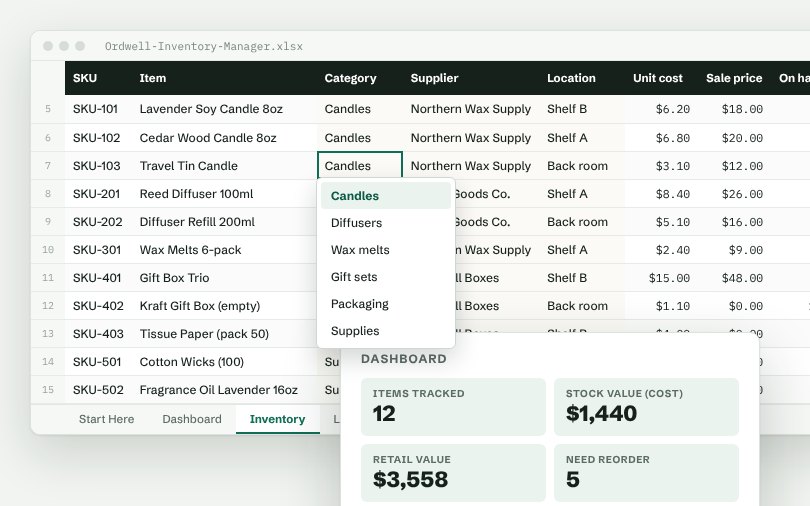
SKU, Item, Category, Supplier, Location, Unit cost, Sale price, On hand.
Numbers worth watching
Items tracked, Stock value (cost), Retail value, Need reorder, Out of stock. Put them at the top of a dashboard tab so you see them every time you open the file.
Skip the setup
The Ordwell Inventory Manager has all of this built: dropdown lists you control from one tab, formulas in green columns and a dashboard that updates as you type.
Free: Simple Order Log
A real Ordwell spreadsheet with dropdowns, totals and a mini dashboard. Pay what you want, $0 is fine.
More guides
- How to track orders in Excel
- How to build a simple CRM in Excel
- How to track appointments in Excel
- How to track a sales pipeline in Excel
- How to track business expenses in Excel
- How to track projects and tasks in Excel
- How to track purchase orders in Excel
- How to track invoices and payments in Excel
- How to track employee hours in Excel