Guide
How to track purchase orders in Excel
A simple method for businesses that buy stock or materials. Works in Excel and Google Sheets, no macros needed.
Step by step
- Give each PO a number, supplier, order date, expected date and total.
- Track status: Draft, Sent, Partially received, Received, Paid.
- Flag POs past their expected date.
- Total open purchase value by supplier.
- Match each PO to its invoice before paying.
Columns to include
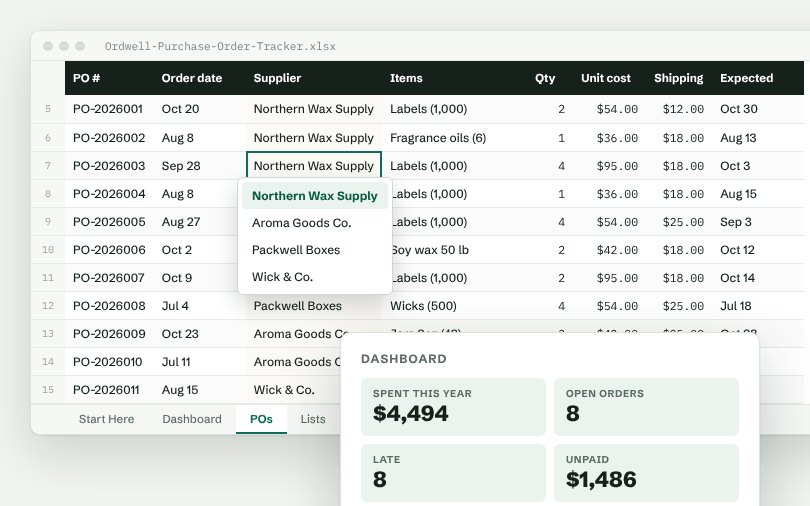
PO #, Order date, Supplier, Items, Qty, Unit cost, Shipping, Expected.
Numbers worth watching
Spent this year, Open orders, Late, Unpaid, Orders placed. Put them at the top of a dashboard tab so you see them every time you open the file.
Skip the setup
The Ordwell Purchase Order Tracker has all of this built: dropdown lists you control from one tab, formulas in green columns and a dashboard that updates as you type.
Free: Simple Order Log
A real Ordwell spreadsheet with dropdowns, totals and a mini dashboard. Pay what you want, $0 is fine.
More guides
- How to track orders in Excel
- How to manage inventory in Excel
- How to build a simple CRM in Excel
- How to track appointments in Excel
- How to track a sales pipeline in Excel
- How to track business expenses in Excel
- How to track projects and tasks in Excel
- How to track invoices and payments in Excel
- How to track employee hours in Excel