Guide
How to track appointments in Excel
A simple method for salons, studios, clinics and consultants. Works in Excel and Google Sheets, no macros needed.
Step by step
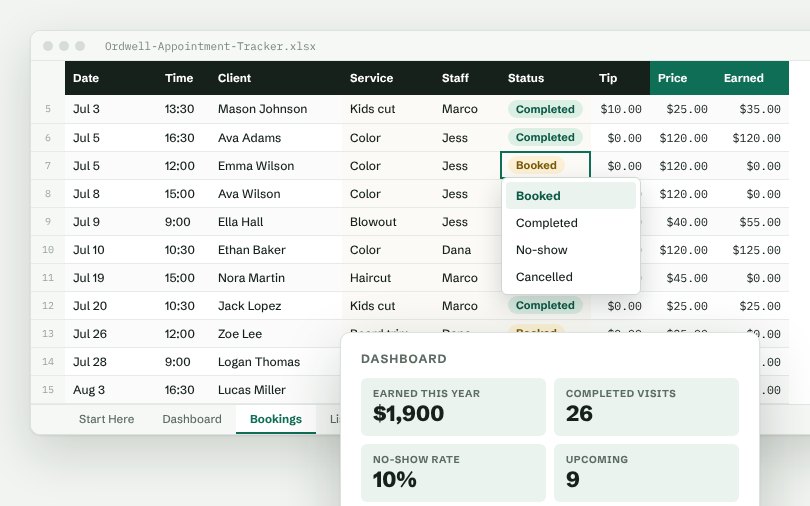
- Record each appointment with date, time, client, service, staff member and price.
- Use a Status dropdown: Booked, Completed, No-show, Cancelled.
- Total revenue from completed appointments with SUMIFS.
- Calculate the no-show rate each month and follow up with repeat no-shows.
- See revenue by service and staff member on a dashboard.
Columns to include
Date, Time, Client, Service, Staff, Status, Tip, Price.
Numbers worth watching
Earned this year, Completed visits, No-show rate, Upcoming, Tips. Put them at the top of a dashboard tab so you see them every time you open the file.
Skip the setup
The Ordwell Appointment Tracker has all of this built: dropdown lists you control from one tab, formulas in green columns and a dashboard that updates as you type.
Free: Simple Order Log
A real Ordwell spreadsheet with dropdowns, totals and a mini dashboard. Pay what you want, $0 is fine.
More guides
- How to track orders in Excel
- How to manage inventory in Excel
- How to build a simple CRM in Excel
- How to track a sales pipeline in Excel
- How to track business expenses in Excel
- How to track projects and tasks in Excel
- How to track purchase orders in Excel
- How to track invoices and payments in Excel
- How to track employee hours in Excel